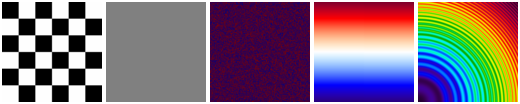
Creates a NetCDF file from command-line arguments. Variables can be any type and filled with data in 5 ways, either a constant, a checker pattern, randoms, linear range, or a sombrero ripple function, all of which can be animated too if they use a record dimension. Specific constants and randoms allowed include positive/negative infinity, NaN, negative zero, minimum denormalized positive for a datatype, and min/max for a datatype. Global and variable attributes can also be created. Advanced controls exist for choosing alignment, blocksize, file flavor (classic or HDF5), prefill, initial size, and header pad. ncmock has throughput and peak memory calipers, so it can also be used as a benchmark tool.
# Create ripple data animated in time.
ncmock -d x,300 -d y,300 -d t,10,record -v test,f,t,y,x,fun1 -n ripple,fun1,5,5 -p ripple.nc

# Create checkerboard data animated in time.
ncmock -d x,300 -d y,300 -d t,10,record -v test,f,t,y,x,fun1 -n checker,fun1,50,50 -p checker.nc

# Create linear range data animated in time.
ncmock -d x,300 -d y,300 -d t,10,record -v test,f,t,y,x,fun1 -n range,fun1,0,1 -p range.nc

# Create constant fill data.
ncmock -d x,300 -d y,300 -d t,10,record -v test,f,t,y,x,fun1 -n const,fun1,0 -p constant.nc

# Create random data animated in time.
ncmock -d x,300 -d y,300 -d t,10,record -v test,f,t,y,x,fun1 -n rand,fun1 -p random.nc

make
make test
make memtest
make example
sudo make install
make clean
make html
make dist VER=0.0.1
$ ncmock -h
ncmock -- NetCDF mock data generator.

USAGE: ncmock [OPTIONS] out.nc

OPTIONS:

-A, --align ARG1[,ARGn]   Controls the byte alignment of the beginning of the
                          data section for fixed size variables and (optional)
                          the alignment of the beginning of the data section
                          for variables which have an unlimited dimension
                          (record variables). Default is 4,4

-a, --att ARG1[,ARGn]     Attribute name,parent,type,values. The values can be
                          a single item or a list that is also
                          comma-delimited. Syntax:
                          name: Any legal NetCDF name.
                          parent: Any variable name or GLOBAL for global file
                          attribute.
                          type: One of
                          char,uchar,short,ushort,int,uint,int64,uint64,float,double.

-B, --bench               Benchmark the time taken to create a file, create
                          metadata, write static variables, write record
                          variables and peak memory usage.

-b, --blocksize ARG       Request custom block buffer size instead of system
                          default.

-d, --dim ARG1[,ARGn]     Dimension name,size[,'record']. Specify a record
                          dimension with the last optional keyword.

-e, --eta                 Display progress indicator with I/O rate and ETA.

-F, --fill                Enable fill mode. Default is not to (pre) fill. Fill
                          values are defined by variables _FillValue
                          attribute.

-f, --format ARG          File format. Choices are 32,64,hdf.

-h, --help, --usage ARG   Display usage instructions.
                          There is a choice of three different layouts for
                          description alignment. Your choice can be any one of
                          the following to suit your style:

                          0 - align (default)
                          1 - interleave
                          2 - stagger

-i, --initialsize ARG     On some systems, and with custom I/O layers, it may
                          be advantageous to set the size of the output file
                          at creation time. This parameter sets the initial
                          size of the file at creation time.

-n, --fun ARG1[,ARGn]     Function for variable data.
                          General syntax is funtype,name[,option1[,...]].
                          Functions are
                          checker: Checkerboard pattern of 0 and 1.
                                   Options are width,height
                                   default is 10,10).
                                   width and height control tile sizes.
                          constant: A single value compatible with datatype.
                                    Use values like 1, -2.1e10, or these
                                    denorm: Minimum positive denormal.
                                    min: Minimum value for type.
                                    max: Maximum value for type.
                                    nan: Not-a-number for type (if any).
                                    ninf: Negative infinity if supported.
                                    -0: Negative zero if supported.
                                    pinf: Positive infinity if supported.
                          none: Values are not set and defined by allocation
                                or prefilled if enabled with "--fill".
                          random: Mix of constants listed above, for example:
                                  -n random,name1,ninf,pinf,nan,min,3.1e5
                          range: Uniform sequence of values from a min to max.
                                 Options are min,max.
                          ripple: Sombrero function resembling water ripple.
                                  Options are width,height,amplitude.

-O, --overwrite           Overwrite output file.

-P, --pad ARG1[,ARGn]     Pad bytes for end of header and (optional) end of
                          static variable data section. Example:
                          65536,1048576

-p, --progress            Display simple one-line progress indicator.

-v, --var ARG1[,ARGn]     Define variable with name,datatype,dims,function.
                          Supported datatypes are char,short,int,float,double.
                          Default function is "none".

--version                 Print version.

EXAMPLES:

ncmock -a author,GLOBAL,char,'Some Body' -d x,360 -d y,180 -d t,10,record \
       -v test,f,t,y,x,fun1 -n ripple,fun1,10,10 -p /tmp/tmp.nc

ncmock 0.0.1 Copyright (C) 2011,2012 Remik Ziemlinski
This program is free and without warranty.
Built with NetCDF 4.1.3 of May  1 2012 07:57:49 $
v0.0.1 2011/12/19 - Bug fix, 0D record values range did not export, such as for "double rec(rec)".
v0.0.0 2011/11/19 - Initial release. Fully tested and no bugs or memory leaks.
ssh -t rsz,ncmock@shell.sourceforge.net create
scp html/* rsz,ncmock@shell.sourceforge.net:/home/project-web/ncmock/htdocs
scp ../ncmock-0.0.1.tar.gz rsz,ncmock@shell.sourceforge.net:/home/frs/project/n/nc/ncmock
Copyright 2011,2012 Remik Ziemlinski under the terms of the GNU General Public License